
Compose
Layered compositor for images, paint, ramps, shaders, masks, versions, and Nodes templates.
Compose is where you build a finished, fixed-size still out of layers — generated assets, paint, text, and gradients — and stack GPU-shader looks and adjustments on top of any of them. Mask effects to exactly where you want them, version the document as a layout evolves, and optionally turn it into a reusable template for Nodes.
When to reach for Compose
Reach for Compose when you need a fixed document size, paint and effect tools, and a version history you can step back through. Use Canvas instead for freeform boards where layout matters more than the exact output, or Share once it's time to hand a folder to a client.
Layout
Compose is a full workspace with:
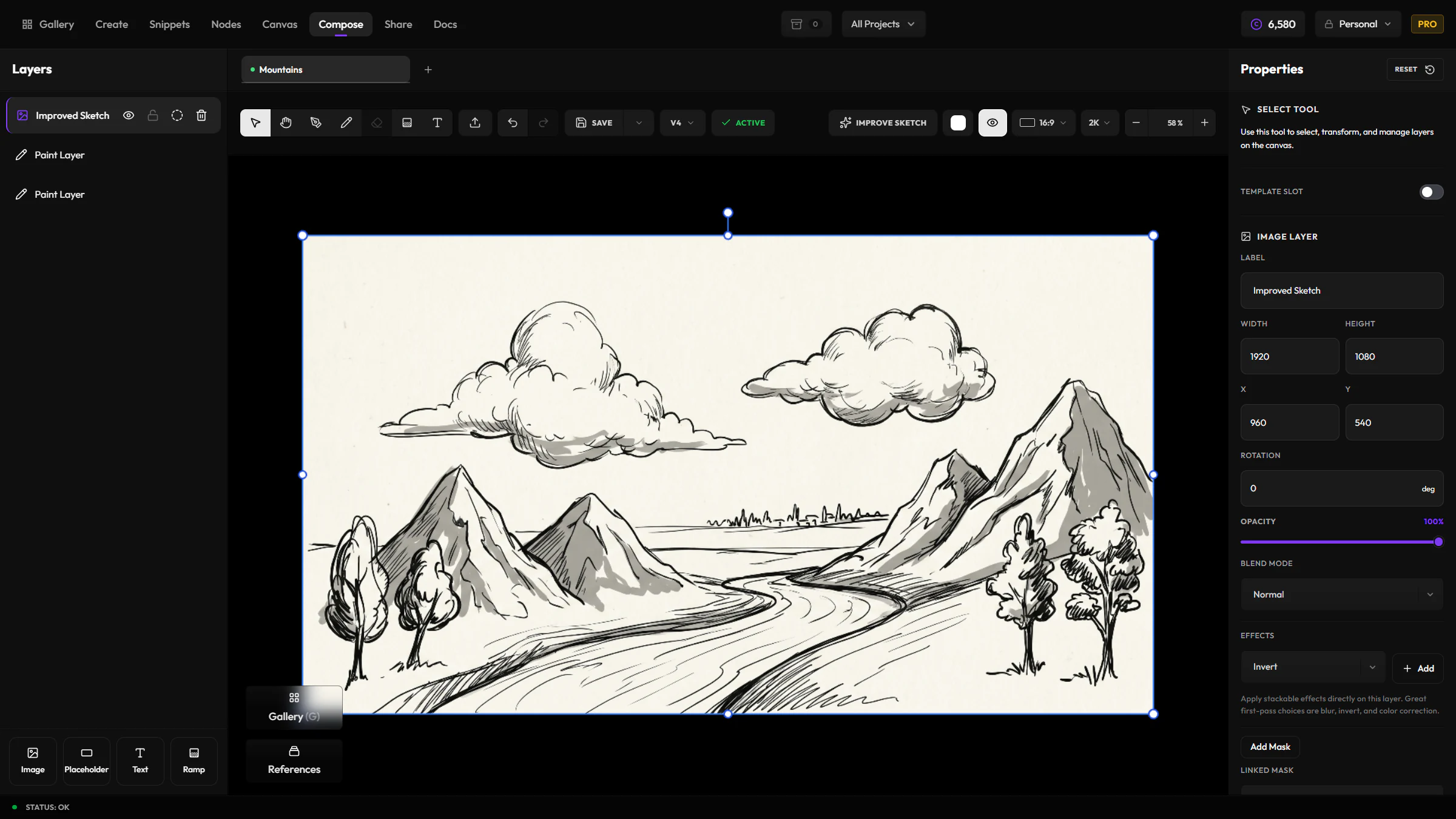
- Toolbar — tools, import, undo/redo, improve sketch, save / versions, canvas ratio & quality, zoom
- Layers panel — stack order, visibility, lock, add layer types
- Canvas — fixed document size (not infinite like Canvas)
- Inspector / properties — layer opacity, blend, transforms, effect stacks
- Optional gallery split — pull assets from your library into the composition
Multiple tabs can hold different compositions open at once.
Layer types
| Type | Role |
|---|---|
| Image | Import from library or disk; tracks source asset / version for lineage |
| Text | Type layers with font, weight, align, fill color |
| Paint | Freehand brush strokes (hardness / opacity) |
| Ramp | Gradient fills |
| Placeholder | Slot for template-driven image content (Nodes) |
| FX | Dedicated effect host layer |
Each layer supports opacity, blend mode (normal, multiply, screen, add, overlay, darken, lighten, difference), visibility, lock, and optional masks.
Tools
| Tool | Shortcut | Notes |
|---|---|---|
| Select | V | Move / select layers |
| Pan | hold Space | Navigate the document |
| Storyboard pen | Shift+B | Thicker pen for rough framing |
| Brush | B | Paint on paint layers; size, hardness, opacity, color |
| Eraser | E | Erase paint (select a paint layer first) |
| Gradient | toolbar icon | Draw ramps |
| Text | toolbar icon | Add / edit text |
Also: Import image, Undo / Redo, copy / paste / duplicate layer (Ctrl/Cmd+C, V, D), zoom to fit (F), toggle gallery split (G), zoom (10%–500%), and canvas background color.
Canvas size
- Presets and free size within 128–4096 px per side
- Aspect ratio presets (1:1, 16:9, 9:16, 4:3, 3:4, 3:2, 2:3, 5:4, 4:5, 21:9, …)
- Quality shortcuts: 1K / 2K / 4K (sets longest edge ~1024 / 1920 / 3840 while keeping ratio)
Layer effects
Effects stack on a layer. There are two groups:
Adjustments
Classic controls:
- Blur · Invert · Grayscale · Brightness · Contrast · Saturation
Shaders (GPU)
GPU fragment-shader looks with rich controls (and preview cards in the Shaders picker):
| Shader | Idea |
|---|---|
| Dither | Ordered pixel dither |
| Halftone / Halftone dots | Print-style dots (grids, ink, invert) |
| Duotone / Tritone map | Two- or three-stop color maps |
| Chromatic aberration | RGB channel split |
| Posterize | Quantized color steps |
| Luminance particles | Mosaic / particle breakup by luminance |
| Threshold ink | High-contrast ink/paper split |
| Diffuse glow | Soft bloom |
| Pixel sort | Glitch-style sorts |
| Riso print | Misregistered dual-ink look |
| Glass distortion | Refractive distortion |
| Fluted glass | Ribbed glass (shape, distortion, fit) |
| Brick blocks | Toy-brick quantization |
| Contour lines | Topographic-style contours |
| Grain | Film grain |
Many shaders support per-effect parameters, colors, and optional effect masks (modulate strength from another layer's alpha or luminance, with invert).
Adjustments are quick to add from the inspector; shaders open a card-style picker.
Masks
- Layer masks — paint-based mask on a layer (brush into mask editing mode)
- Mask layers — use another layer as a mask (alpha or luminance)
- Brush can paint additively or in mask eraser mode
Improve sketch
It redraws, not just cleans up
Improve sketch doesn't trace over your strokes — it redraws the composition from scratch using your sketch as a staging guide. Expect a genuinely new render, not a tidied-up version of what you drew.
With paint on the canvas, Improve sketch sends the current document through an AI pass to reinterpret your strokes while keeping the composition and staging. Credit cost scales with document quality: 7 credits at 1K, 11 at 2K, 16 at 4K.
Versions & gallery
- Save overwrites the current version in place and pins it as the version Gallery shows
- Save new version adds a new revision, numbered above the highest version so far, and pins that one instead
- Create copy stages a duplicate under a new name — nothing is written until you save it
- Set as active re-pins an earlier version as the one Gallery shows, without creating a new revision
- Version history loads prior revisions
- Compositions appear in the broader asset library / gallery with version awareness
Templates & Nodes
Layers can expose template slots (image or text) so a composition becomes a reusable Compose template for the Nodes app. Placeholders define how slotted images fit (cover / contain / stretch / manual).
Execution produces derived compose assets; templates themselves stay reusable.
Workflow tips
- Build with image + paint + text, then stack shaders for look development
- Use masks to localize grain, glow, or glass instead of full-frame application
- Prefer versions when iterating looks for the same layout
- Use Canvas for freeform boards; use Compose when you need fixed output size, FX, and exportable compositions